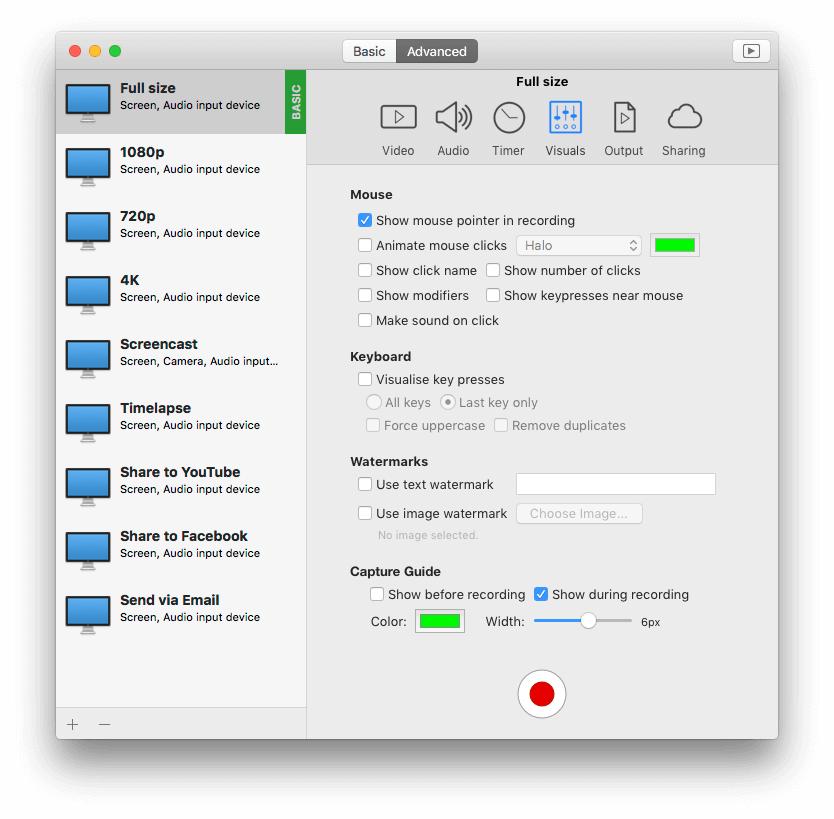

iShowU HD & HD Pro 2.1.5*Beta* This is a test release. The latest stable is listed below.
2.1.5 (16 July 2010)
- Fixes
- Fixed issue with camera discovery causing crash on startup.
- Major Thumbnail Rewrite: Due to excessive instability with QuickTime, the thumbnailer has been removed an put into another process. This should fix the majority of crash issues.
- Fixed issue where resizing the window while recording could sometimes cause the recording to stop (especially noticeable in 10.5).
- Fixed bug in countdown timer that could cause a crash if you did a retake while counting down.
- Further locking/hang fixes.
- Undo now works for deleting watermarks.
- Resolving issues related to the preview, switching between screens, and changing monitor configurations.
- Fixed an issue cleaning up the preview when it's reset (could have caused a crash).
- Fixed the Presets editor so it doesn't do "weird stuff" when duplicating presets, and renaming presets.
- Additional safety and locking in Recording layers and Media Checkpointer.
- Added additional safety to the MouseCompositor, addressing issues with changing mouse cursors in CS5 (again, I don't have CS5 so cannot test).
- Placed additional locking around audio shutdown (hopefully fixes issues with MOTU devices - I don't have one so I can't verify).
- Fixes to QuickLook under Snow Leopard.
- Fixed issue in Disk Stage of Low CPU mode.
- Fixed bug starting HD on 10.5.x systems that'd cause a failure upon startup.
- Further locking fixes within audio, and some further tidy up's after thumbnailing.
- Cleanups in the thumbnail renderer, lots of additional locking, much work around making capture lifecycle more robust.
- Fixed lock conflict in Camera Compositor that could cause a crash.
- Fixed possible crash upon startup (GetCodecList and detection of cameras were walking over each others toes).
- Fixed a potential problem with media checkpointer (it was possible for it to crash - which might be the source of a couple of crashes recently).
- Fixed bug in the SSL initialization that could cause a crash at startup.
- Fixing registration system.
- Further improvements to stability (fixing rare crash during start of recording).
- Fixed a serious problem that could cause out of memory errors and bad recordings.
- Fixed the problem where compressing would never end.
- Fixed color correction for Low CPU recordings.
- Fixed crash when recording directly over the top of a previous recording (while prompting for recording names) - also fixed a potential crash when checking storage preferences.
- Fixed recording in mono, so that it works correctly with other (non QT) players and also when uploaded to YouTube.
- Sound recording is now more resilient if the sound source is interrupted often (as can be the case with digital inputs). A side effect is that recording will be more resilient under wider load situations.
- Fixed issue with audio where devices with different sample rates could result in glitches when recording.
- Fixed problem that could cause a crash when stopping recording.
- Changes
- You can now toggle on/off the preview window.
- Implemented ability to mix audio into 2ch AAC before uploading to YouTube.
- Undo is now working.
- Readers of iCreate magazine can now use version 2.1.5 as well as version 2.1.4.
- Drastically improved performance within the video bar (no longer crashes with 150+ recordings either) and fixed various selection problems.
- A few missing localized resources were found and added.
- A check is made for accelerated renderers before the app begins. This prevents needless an unhelpful crashes if you've no display connected.
- There is now an option in preferences that disables "sleep" while Low CPU mode is compressing a video (so you can ensure your machine doesn't go to sleep while it's compressing, but does after it's done)
- Added Undo functionality to the video bar when deleting videos. It'll now move them back from the trash if that is where they were put (or just put them back into the video bar, if you didn't move them to the trash).
- Added Abort option to the status menu, and Edit menus. The dialog now no longer pops up if you are holding the shift key at the time you choose to abort (this mimics the behavior of iShowU v1).
- Added option to edit the capture area to the Edit menu.
- The Upload dialog now remembers it's state (title, description, keywords and last chosen category).
- Updated the Russian localization.
- *New* Italian localization!
iShowU HD & HD Pro 2.1.3
2.1.3 (14 January 2010)
- Fixes
- Fixed a bug that could cause a crash on startup.
- Fixed a possible registration problem (would prevent registration in some cases).
- Fixes for blue/purple screen on some G5 machines.
- HD (not HD Pro) now defaults to Low CPU mode off, and variable frame durations ON. This mirrors the behavior of iShowU v1.
- Fixed a bug with "record application audio" that could cause delays (massive latency) in the audio.
iShowU HD & HD Pro 2.1.2
2.1.2 (30 November 2009)
- Fixes
- Improved startup time.
- Now responds to Delete (key, and menu item) in a sane manner. Delete with a watermark or camera selected, deletes the watermark or disables the camera. Delete with a recording selected, is the same as pressing the X button on it's top right.
- Fixed a bug whereby clicking in the file list to replace an existing recording would end up using the wrong name.
- Fixed a problem showing CMYK colors with the capture guide.
- Fixed the Soundflower installer for Snow Leopard (also now upgrades if required).
- Fixed a problem with watermarks not being deleted correctly.
- Fixed a bug causing the preview to not work on machines with more than one graphics card.
- Resolved an issue that could cause a fault during loading of defaults.
- Fixed bug with HD crashing upon startup on PPC machines.
- Fixed capture not starting (just showing orange indicator in menu bar).
- Fixed a number of bugs that could cause hangs.
- Fixed a bug that could cause a crash during recovery.
- Application audio now correctly reduced to mono if final output is set as mono.
- Fixed the capture guide in Low CPU mode.
- Fixed a bug that could cause a hang while quitting the application.
- A number of general improvements and fixes (automatic stopping of recording, preview overlay).
- Corrected a bug affecting the QuickTime video settings dialog, and setting of custom FPS values.
- Changes
- Color correction now enabled only if hardware supports it (fixes purple color with GMA, ATI 9600).
- Experimental Color Correction (can be enabled in General preferences).
- Updated manual describing new countdown features.
- You can now perform retakes (via shortcuts only).
- Added option to turn of the sound played when recordings are completed.
- Selection and customization of presets fixed (now selects correctly from the dropdown).
- How replaces existing recordings correctly (thumbnails refresh correctly).
- HD will now behave correctly if you move/rename existing recordings using Finder (it'll keep track of the changes).
- Keyboard compositor no longer shows pause, stop or camera toggle shortcuts.
- Soundflower updated to 1.5.1.
- Added Howcast upload script.
- Changed the way application shutdown operates again (this I've fixed the crash on quit bug this time).
- You can now turn off the warning message re 'Enable support for assistive devices' in Universal Access (useful if you are not able to turn it on). See the Display Preferences.
- You can now move back to a non-beta without resettings configuration files - HD does 'the right thing' (tm).
- You can now specify the color of the capture guide.
- Added presets for iPhone Simulator.
- You can now specify the capture size and video output size directly (see the "gear" dropdown menus).
- You can now change the color of the mouse animations.
- Screensaver and Energy Saving now disabled during recording (no settings are changed).
- Added option to monitor (or not) the application audio.
- Checkpoint time increased from 5s to 60s. This drastically reduces overhead in longer H264 movies.
- Added an indicator in the timer window, showing when the camera is active.
- Added some additional validation around output video size.
- If you're using HD Pro, and you've not removed the example watermark, you'll be prompted when you record so that you have the chance to remove it before doing a long record without realizing that it's there.
- Updated the YouTube and Blip.TV defaults.
- Updated Russian, French, Japanese and Simplified Chinese localizations. Localizers: The advanced panel will now auto size it's width based on your translations (thanks to Michael Krekin, Roland Leroux, Koichi Matsumoto and He Yunxuan).
iShowU HD & HD Pro 2.1.1
2.1.1 (24 May 2009)
- Noteworthy changes
- Fixes for audio synchronization, video smoothing and a huge number of bug fixes.
- Fixes
- Fixed crash when closing the upload error notification window.
- Performance of the preview improved! (yay!), fans should no longer spin up in preview. Gee, that OpenGL course in Germany *was* worth it!
- Fixed problems recording in Auto and Low CPU modes (introduced with prerolling support).
- Eliminated audio/video sync issues that were occurring randomly.
- Fixed a bug that'd cause the capture area to be slightly off now and then (race condition) on NVidia cards.
- Fixed a crash bug with prerolling.
- Fixed bug causing Digidesign and other multi-stream audio devices to fail. These should now record correctly.
- Fixed compositing issues.
- Fixed the timer overlay being recorded in the first couple of frames. Made it look nicer as well.
- Fixed bug whereby pressing space to QuickLook a completed recording would edit the width/height if you had the QT tab open in the Advanced panel.
- Fixed the YouTube script (uploading now works again).
- Fixed a couple of issues that could cause HD to hang.
- Fixed bug that could cause recording of system audio to fail sometimes.
- Greatly reduced tearing that could occur over the mouse, watermarks or camera when under load.
- Fixed a possible crash bug when deleting the video while it was compressing.
- Fixed recent error with Camera (QTCaptureVideoPreviewOutput crashes)
- Fixed a hang condition (yay!).
- Fixed error handling within compressor so that it doesn't crash if certain errors are received.
- Fixed bug where keyboard compositor would sometimes draw itself into the first frame of the movie even when no keys were pressed.
- Fixed crash while stopping recording.
- Fixed some bugs in Low CPU mode.
- Fixed bug that could cause a crash when changing watermarks, camera or other compositors.
- Fixed bug causing texture leaks in the capture pipeline.
- Fixed a number of audio bugs (causing crashes). The system will now warn you if it can't do something (like set the default output device back to what it was before).
- Fixed a bug in the upload service that could potentially cause a crash (when discovering services).
- Soundflower is now unmuted if it's muted when you enable recording of computer audio (inc. making sure SF is configured correctly when choosing to record system audio).
- Added options to show capture guide in preview and/or recording.
- Shortcuts now work if Universal Access is disabled (won't work in full screen OpenGL applications however).
- Fixed resume of movies in Auto mode (the end of the movie wasn't being written correctly).
- Fixed a few small memory leaks.
- Fixed some UI sizing issues for other Locales.
- Fixed the crash with GMA950, and preview (would have crashed on startup).
- Opps! Forgot to swap color bits for PPC machines - fixed.
- Changes
- Pause is fixed.
- Considerably reduced latency in the audio recording.
- Fixed the compositors when drawing into negative space (left hand monitors).
- Made a change to allow more keyboard types to work for shortcuts.
- Fixed a bug that could cause a crash when reporting an problem with Audio (would only happen if there was a problem with Audio in the first place).
- Fixed weird aliasing bug that was sometimes visible on the top / right of a full screen capture.
- Fixed bug that would cause a corrupted movie if absolute silence was recorded in Low CPU mode (blame QT!).
- Further enhancements to Low CPU mode.
- Rate limiting smoothing enhanced (again). This kicks in if your computer can't keep up with the recording.
- You can now use either delete key to delete a watermark.
- Audio is now kept in sync over time properly.
- Added Compress Rate to the performance monitor. This is the number of frames per second being sent to the compressor (excluding duplicates).
- iMovie 06 HDV 720p capture size changed to 1280x720.
- Added Intermediate - SD PAL. 768x576 30fps.
- Widescreen formats removed from Final Cut presets (960x720 and 1440x1080). Not required when using square pixels.
- Support for beta releases. You can now enable a check for beta releases in Software Update. This will keep you up to date with beta builds.
- You can now start the capture from the menu bar menu.
- About box, menus and window title now show 'iShowU HD Pro' if you are using the Pro version.
- Increased the height of the key press overlay.
- Key press overlay no longer shows spaces as symbols, doesn't show the shift key as often, no longer collects modifier keys together, and includes support for F17-F19 function keys.
- Capture rate now limited to the refresh rate of the display (smoothes things out if you're running a low refresh rate).
- YouTube high quality resolution now 852x480.
- YouTube normal resolution now 640x360.
- Added a menu bar item "show window" that lets you bring up the main UI window. Useful for those people who have turned off the "Show icon in dock" option in preferences.
- Soundflower 2ch removed from the list of available input devices.
- Updated the German localization.
iShowU HD & HD Pro 2.1.0
2.1.0 (28 November 2008)
- Noteworthy changes
- Upgrade note
If you run this version you won't be able to use a previous version of iShowU HD without first making some changes. Please see this post for details. - Recording Recovery - Normally if you have a crash or other terminal event during recording your work is lost (and that's BAD). shinywhitebox humbly preset: recovery. Restart iShowU HD and it'll now recover as much of your movie as is possible.
- Low CPU mode is now more efficient - up to 35% depending on the size of your recordings (larger recordings see a greater efficiency boost). This means up to 35% less CPU and around the same reduction in disk bandwidth per second.
- New: Now upload to blip.tv
- New Low CPU modes - Now you can replicate iShowU Classic functionality and have variable length durations for your video frames (this'll break Final Cut compatibility - but at least you get the choice now). This option is available in pro mode only.
- Thank you to everyone who installed Smart Crash Reports and submitted reports.
- Fixes
Fixed recording at 29.97 fps. Now imports correctly into Final Cut. Fixed crash that could occur (audio related) when shutting down. Fix for potential crash situation between grabber and preview. Fixed crash on startup if screen not accelerated. - Fixed error where capture preview wouldn't restart upon un-hiding the app from the dock
- Better detection of compatible screen types and cards at startup.
- Fixed errors that were occurring when recording audio at high sample rates (96khz+).
- Pause now ... pauses.
- Upload scripts are now upgraded if necessary.
- Fixed issues with HD (non Pro mode) when recording. Recording rate (fps) is now smoothly limited to what the compressor can achieve in realtime (since HD doesn't have a Low CPU mode). This results in movies that are considerably smoother than they were in previous versions (e.g: recording Google Earth).
- All preset tooltips now have correct tooltips.
- Now presents a warning dialog if an attempt to upgrade a persistent store fails.
- Changes
- Mono option now forced in non-Pro mode (all channels are in mono now).
- Improved audio capture (no longer get any pops/clicks when under load).
- Extra checking around sound device manipulation.
- Countdown timer can now be moved during the countdown (and doesn't overlay the entire screen any more).
- More presets for Final Cut (Apple Intermediate versions of the ProRes presets).
- Various registration system updates.
- Default preview rate set to 12 fps (reduces preview load while idle).
- Fixes and enhancements to the audio recorder.
- Updated instructions on the Capture area display (Return - confirm capture area).
- Update the manual with information about recovery mode, and the new Low CPU mode options (Off, Auto, On).
- Added additional help items to the Help menu.
- Added Brazilian Portuguese localization.
- Added French translation.
- Translators - updated xibs
- RegistrationController.xib
- CaptureSettings.xib.
- MainUI.xib
iShowU HD & HD Pro 2.0.6
2.0.6 (24 November 2008)
- Changes
- Merged into 2.1.0
iShowU HD & HD Pro 2.0.5
2.0.5 (20 November 2008)
- Changes
- Merged into 2.1.0
iShowU HD & HD Pro 2.0.4
2.0.4 (01 October 2008)
- Changes
- Merged into 2.1.0
iShowU HD & HD Pro 2.0.3
2.0.3 (24 September 2008)
- Changes
- Performance improvements to the Low CPU mode.
- If you're showing keypresses and use the shortcut keys to stop recording, iShowU HD now correctly cuts off the end portion of the video that would show those keypresses.
- Watermarks, keyboard compositor and camera are now centered correctly.
- Fixed the inverted mouse cursor that would appear when using some applications (Word 08, TextWrangler for example).
- Fixed a bug that caused HD to not record properly (would stop after a second or so).
- Fixed some frame reconstruction issues only visible with very unusual capture/output sizes.
- Sample watermark now updated to say "press delete to remove".
- German and Russian localizations.
iShowU HD & HD Pro 2.0.2
2.0.2 (10 September 2008)
- Fixes
- Fixed a bug causing the overlays (green boxes) to display in the wrong location.
- Fixed issue causing the Display preferences icon to not show in Preferences.
- Fixed performance issues with 8000 series cards.
- Fixed issue with mouse follow modes whereby they would start jumping wildly when run at low frame rates.
- Fixed issue with preview mode showing errors in the console log after recording.
- Fixed a couple of bugs that could cause a crash.
- Fixed bug causing keyboard compositor to not be shown in demo mode.
- Changes
- Additional items in the toolbar pop up menus for capture and output sizes of two-thirds (2/3).
- Smoother mouse follow modes.
- UI now more responsive. It'll now aggressively limit itself (during preview only) to maximize the overall usability and experience of OSX.
- Updated to Smart Crash Reports 1.5 - which we hope will remove some strange dialogs users have been seeing.
- A number of performance optimizations.
- Updated the manual.
- The iShowU HD window is now hidden when choosing the selection area.
- Capture sizes are no longer constrained to multiples of 32. This used to be the case for Intel GMA based machines.
iShowU HD & HD Pro 2.0.1
2.0.1 (06 September 2008)
- Noteworthy changes
- While the X3100 no longer crashes, it's much slower than we would like. We are working with Apple to solve this issue.
- Performance enhancements to capture. Most noticeable on machines on Intel NVidia 8xxx graphics hardware.
- Fixed hang bug with X3100 and MacBook.
- Fixes
- Preview now limits its frame rate to that specified in the video capture settings.
- Fixed crash in mouse movement.
- Fixed bug causing preview window not to resume after being hidden.
- Fixed keyboard compositor crash.
- 1:1 capture now clearer.
- Changes
- Support for multiple graphics cards (e.g: X1900 & 8800GT in a MacPro).
- "Open Settings" has been changed to "Open Presets".
iShowU HD & HD Pro 2.0
2.0 (30 August 2008)
- Noteworthy changes
First Public Release
Requires
OS X 10.5 (Leopard) and a G5 or Intel based Mac.
Does not run on G4
machines - or OS X 10.4