
My account

iShowU HD Pro

Real time screen recording for your Mac

  • Snow Leopard
  • Lion
  • Mountain Lion
  • “simple screen recording solution with instant file output, no waiting time at all”
    MacAppZone.com
  • “Blazing real-time performance”
    bonsai-studio.net
  • “lots of appreciated polish”
    arstechnica.com
  • “iShowU HD and Pro are impressive”
    arstechnica.com
  • “supports a ton of compression formats”
    macapps.net
  • “boasts a laundry list of features”
    macapps.net
  • "I recently upgraded to iShowU HD Pro and couldn't be happier."
    Eric Rier, Fat Free Interactive

Let the pictures do the talking

Want to capture everything on your screen? 3d games bogging down ordinary screen capture software? Those days are over: welcome to iShowU HD. Built for speed. Built to “just work”…

iShowU HD has been rebuilt from the ground up to provide blazing real-time performance with a brand new, easy-to-use interface. With professional features like drag-and-drop to Final Cut and multi-channel audio capture just a single click away, iShowU HD has all the power you’ll ever need at a price you can deal with.

iShowU HD Pro Features

Instant Capture

Instant Capture

No need to export the video for it to be usable1. Once recording is complete you can immediately email it, or drag it into a video editor for further editing.

1 Excludes low CPU mode

Record Keyboard & Mouse

Record Keyboard & Mouse

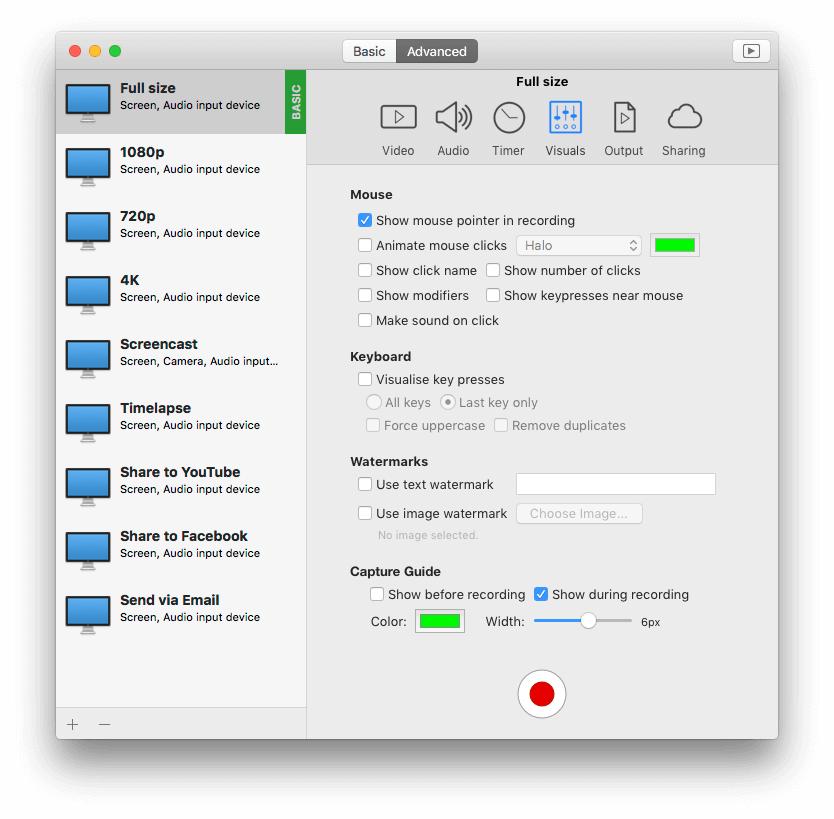
Show your viewers the keys you’re using to perform tasks (HD Pro only). Identify when you’re clicking the mouse by using a mouse action.

Record from iSight & DV cameras

Record from iSight & DV cameras

Personalize your presentation using your built-in iSight camera, or indeed any connected camera!

Real-time Preview

Real-time Preview

Use any picture or image as a watermark by dragging it directly onto the preview. (HD Pro only)

Upload to YouTube / Blip.TV

Upload to YouTube / Blip.TV

Upload your finished product directly to YouTube or Blip.TV2. Built-in presets to get the best quality.

2 Add upload functionality to your site. See the Upload API documentation.

Supports Pro Apps

Supports Pro Apps

Includes built-in presets for Final Cut. Finished recordings can be dragged directly from iShowU HD into the timeline. (HD Pro only)

Point & Shoot

Point & Shoot

Don’t be restricted to capturing only the full screen. HD lets you specify your own capture area. Say goodbye to "post cropping" of video.

Real-time super fast scaling

Real-time super fast scaling

Want to record at half the size? 2560×1900 into 720p? Now it’s no longer a problem – iShowU HD has realtime super quick GPU scaling.

Screenshots

  • iShowU HD Pro screenshot - Camera overlay

    iShowU HD Pro screenshot - Camera overlay

    Include a camera overlay in realtime - position it where you want simply by dragging it about in the preview window. Border color and thickness can be changed at will.

  • iShowU HD Choosing Capture Area screenshot

    iShowU HD Choosing Capture Area screenshot

    Easily change the capture area. Either point at a window, or drag a rectangle around the area you want to capture.

  • iShowU HD screenshot

    iShowU HD screenshot

    Realtime capture and on the fly GPU scaling. Nothing is faster than iShowU HD Pro. Multi track audio recording, GPU video scaling, watermarking and camera overlays.

  • iShowU HD keystroke recording screenshot

    iShowU HD keystroke recording screenshot

    Make your presentations clearer by recording keystrokes and mouse clicks (mouse click animations not shown in above image). Mouse click animation color can be customized.

Comparison

iShowU HD HD Pro
Realtime capture Yes Yes Yes
Pause/Resume Yes Yes Yes
Follow Mouse Yes Yes Yes
Record microphone audio Yes Yes Yes
Record system audio Yes Yes Yes
Custom presets Yes Yes Yes
On the fly GPU scaling No Yes Yes
Custom backgrounds No Yes Yes
iSight/Webcam support No Yes Yes
Automatically detects and scales full screen apps1 No Yes Yes
Upload to web2 No Yes Yes
Embed watermarks No No Yes
Record Keystrokes No No Yes
Support for all CoreAudio inputs3 No No Yes
Specific support for Final Cut Express/Pro4 No No Yes
Low CPU usage mode (L/SL only)5 No No Yes

1 Keynote, Worlds of Warcraft, etc. iShowU HD will automatically capture the full screen when an application itself goes “full screen”.

2 YouTube, Blip.TV and Howcast built-in.

3 Multi Channel Mixer. HD Pro lets you capture every audio channel independently (so if you want to remix just one later, that is possible).

4 In general, Final Cut prefers video with no “skipped frames”. iShowU HD Pro lets you specify whether or not gaps in a recording should be filled or expanded to fill the correct frame duration.

5 Low CPU mode is available for machines running Leopard or Snow Leopard only. Put another way, Low CPU mode isn’t available for Lion or Mountain Lion.

Upload scripting

It’s extensible

iShowU HD isn’t just limited to YouTube. We’ve included the ability for users to add further scripts with the intention of folding popular scripts into the product.

This page will provide a brief overview of the kinds of tasks required in order to create a new upload script.

For further information, we recommend going to the forums (there’s a specific forum for upload script development).

More detail

For the YouTube uploader, we chose Python for implementation. This is because it has a wide variety of third party classes available for various connection oriented tasks. Also, Dave likes Python :-)

iShowU HD presume that the script follows a certain “interface”.

iShowU HD (the UI) will call the script (the various —list-xxx commands) to gather information such as the media categories and what options are required / supported by the service being uploaded to.

There is further documentation available that describes the expected inputs and outputs to the script. Please read this to see what is expected.

Installation is a matter of placing two files in a known directory location. One being an image and the other the script. iShowU HD will automatically discover services when it starts.

To watch a video on how to implement a script, please visit this page.

$ ./isuhd-youtube-upload.py --help
Usage: isuhd-youtube-upload.py [options] file
Options:
  -h, --help            show this help message and exit
  -u USERNAME, --username=USERNAME
                        The account to upload to
  -p PASSWORD, --password=PASSWORD
                        The account's password
  -z DEVKEY, --devkey=DEVKEY
                        The Developer Key
  -t TITLE, --title=TITLE
                        The movie's 'as displayed' title
  -c CATEGORY, --category=CATEGORY
                        The short form category
  -d DESCRIPTION, --description=DESCRIPTION
                        A text description (in quotes) for the movie
  -k KEYWORDS, --keyword=KEYWORDS
                        Add a keyword, feel free to call multiple times
  --list-requirements   List required parameters
  --list-options        List optional parameters
  --list-categories=LIST_CATEGORIES_LANGUAGE
                        List available categories (pass locale - i.e. en-US)

Changelog

2.3.6(22 April 2013)

  • Changes

    • Added the option to 'force mic audio to mono'.
  • Fixes

    • Fixed problem where the first video recorded in a session would replace subsequent recordings. This occurred in some cases when the "Mix all audio to 2ch Stereo" was enabled in the QuickTime tab, or used via the context menu.

2.3.5(04 April 2013)

  • Changes

    • iShowU HD disables LowCPU mode in the HD version (Pro version still has the option).
    • Better detection of accelerated renderers upon startup.
  • Fixes

    • Fixed up the AAC warning message, which was displaying incorrectly when microphone recording was disabled.
    • Fixed up the YouTube script - it wasn't filtering out deprecated categories.
    • Possible fix for the inability to record video (i.e: some users getting audio only)
    • Provided error checking and automatic switching to PCM when the microphone device cannot be recorded directly into AAC.
    • Horizontal resolutions are automatically rounded up to a multiple of 32 when using Intel HD 4000 gfx cards.
    • Fixed typo in the user manual.

2.3.4(14 February 2013)

  • Changes

    • Added a back-end feature to switch the ordering of registration checking (user vs shared) - useful if installing using images.
    • Added option to enable a more 'wordy' rendering of 'Tab', 'Option', 'Command', 'Control' and 'Shift' key presses.
  • Fixes

    • Resolved an issue that could cause a hang upon starting the application.
    • Fixed issue where some people couldn't record in AAC - resulting in the "Compressing..." (forever) problem.
    • Fix problem with HD where it won't start if an non-accelerated (e.g: USB -> DVI adaptor) display is attached.

2.3.3(09 November 2012)

  • Fixes

    • Fixed crash due to not having SF installed (sorry bout that).
    • Made handling of SF switching better. Now it only resets/switches when it has to.
    • Fixed crash issue on Mountain Lion when switching presets.
    • Fixed a couple of deadlock issues when switching between presets quickly.

2.3.2(02 August 2012)

  • Fixes

    • Fixed issue on Mountain Lion whereby enabling/disabling microphone would cause a crash.
    • Fixed incorrect rendering of toolbar images on Mountain Lion.
    • Implemented a fix for the "1280x720 alternating" frame bug when using H.264 under Mountain Lion.

2.3.1(09 July 2012)

  • Changes

    • Added feature: If drop-frames is enabled, it is only enabled when the mouse is not moving. Now, unless you've an explicit reason not to, you can leave "Drop Duplicate Frames" enabled in iShowU Preferences, and it'll 'Just Work'
    • iShowU HD can now make use of Retina displays when running on Lion or above. Capture will by default scale down the content, but if you choose to scale up (by say, 2x) then you'll see more detail in the final movie.
    • Added ability to drop duplicate frames under Mountain Lion.
  • Fixes

    • Resolved issues with Retina displays (Lion only).
    • Fixed alignment and padding issues with capture under Lion, meaning that capture's exactly reflect the chosen/selected area now. No more 'one pixel' boundaries in final movies.
    • Fixed scaling/blur issue in Lion with Retina displays where you'd not get a clear image if you captured and area and had an output size of x2 (which is in effect a 1:1 capture for a Retina display machine). Now it's crisp.
    • Fixed up an issue with the most recent beta build not working on Snow Leopard.

2.3.0(18 June 2012)

  • Changes

    • Now built as an Intel only binary, with a minimum requirement of 10.6.6.
  • Fixes

    • Modified the 'do you want to remove the watermark' message to make it clearer when the preview isn't showing.

2.2.9(08 May 2012)

  • Fixes

    • Support for Gatekeeper under Max OS X 10.8 (Mountain Lion)
    • Fixed issue on machines such as MacPro that'd cause Application audio to be routed to the internal speakers.
    • Fixed the 1422 fix. Sorry bout that.
    • Automatically increase relevant SF2ch channel/master volumes when enabling recording of application audio. Fixes problems related to not being able to hear application audio, when recording of app audio is enabled.
    • Further fixes to Localization.
    • Fixed potential crash under 10.5.8 when resizing the main window.
    • Fixed app not starting on 10.8 (Mountain Lion Developer Preview).
    • Widened a number of UI element to better accommodate non english translations.

2.2.8(11 January 2012)

  • Fixes

    • Fixed issue with AppleScript integration where specifying a relative filename wouldn't work.
    • Fixed issue on machines with internal speakers whereby HD (under Lion) would often set the output to "Internal Speakers" instead of Line-Out (or Digital Out).

2.2.7(07 November 2011)

  • Fixes

    • Build 1317+:
      • Temporarily removed the option to monitor mic audio as it's causing a crash under Lion. It'll be re-enabled once the reason is found, and the problem is fixed.
    • Build 1315+:
      • Bumped revision number to be same as iTunes AppStore version.
    • Build 1305+:
      • Fixed crash when trying to record ProRes on Lion (when the machine didn't have FCP/X installed).
      • Fixed hang when updating. Fix will work for subsequent updates.
    • Build 1290+:
      • Fixed small memory leak.
      • Bumped revision number to be same as iTunes AppStore version.

2.2.6(27 October 2011)

  • Fixes

    • Build 1305+:
      • Fixed crash when trying to record ProRes on Lion (when the machine didn't have FCP/X installed).
      • Fixed hang when updating. Fix will work for subsequent updates.
    • Build 1290+:
      • Fixed small memory leak.

Get a bundle and save

  • iShowU HD Pro + Stomp

    69.95 USD

    iShowU Pro HD + Stomp bundle

    The full shiny experience! Included is the pro version of iShowU-HD and Stomp.

  • iShowU HD + Stomp

    49.95 USD

    iShowU HD + Stomp bundle

    For those wanting the best value video creation and compression. This bundle contains iShowU HD and Stomp.

  • iShowU v1 + Stomp

    42.00 USD

    iShowU v1 + Stomp bundle

    Full versions of both iShowU (for creating videos) and Stomp (for compressing videos) for less dosh. Gotta be a good thing!

Tiger and Leopard Support

Our current builds require at least Snow Leopard (10.6.6+) to run. For those of you still running Tiger or Leopard, we've kept some builds around for you that you might find useful. We can't support Tiger/Leopard any more (we just don't have the resources), but we'd like to make the build available in case it's useful.

iShowU HD v2.2.9 (Leopard+)